Spring '27 Syllabi Review Period Open
Review Spring 2027 sections with missing components and add syllabus content by November 8, 2026.
Syllabi Project Overview
The updated policy requires specific information about all undergraduate courses be made publicly available. As part of this process and to ensure compliance with digital accessibility standards, the current option of displaying full PDF syllabi in MyUI to logged-in students is being discontinued. Beginning fall 2026, required syllabus elements will be publicly displayed in MyUI Course Browse, similar to course descriptions and other catalog information. While PDF uploads of syllabi will remain available in MAUI, the syllabus PDF will not be viewable in MyUI.
New data fields were created to store and display assessments, learning objectives, and topics in MAUI. The existing fields for course title, readings, textbooks, and other resources will not require any changes to current procedures.
Topics and assessments information will replicate from like-session to like-session. Learning objectives show consistently across all sessions.
Key Dates and Deadlines
-
September 23, 2026 - Spring 2027 sections are available for review
-
- Syllabi content was replicated from fall 2026 sections to matching spring 2027 sections based on course section numbers.
- For courses offered only in the spring, content from spring 2026 syllabi was used to populate fields when available.
-
September 23-November 7 - Departmental review and edit period
-
- Assessments, Topics, and Learning Objectives data entry resources are available.
- Department administrators can utilize any/all of the following to review spring 2027 syllabi compliance:
- Syllabi Compliance report - Please be patient; the report takes time to load and will be your best resource.
- Syllabus Content Review report
- MAUI Syllabi report
- Syllabus panel in MAUI Offerings Planner - the Syllabus panel within course sections has been updated to show all syllabi-related content. To view this information, open a course section and select the Syllabus tab.
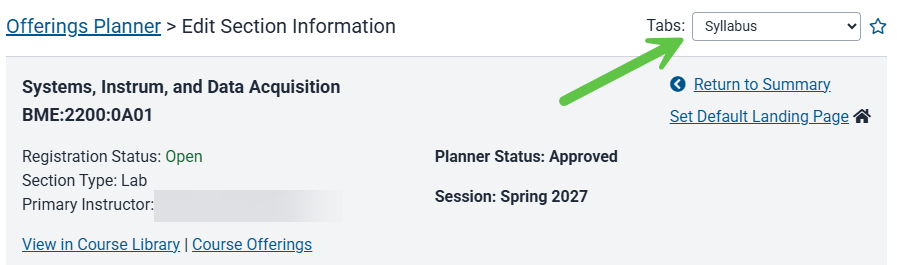
-
November 6, 2026 - Deadline to add/update information for spring 2027 courses
Syllabi Project Dates and Deadlines (Spring 2027)
Courses Subject to and Excluded from Policy Compliance
Courses Subject to Syllabi Policy
- Undergraduate courses (0000–4999)
- Stand-alone sections and lecture sections are checked for compliance
Syllabi Policy Exemptions
The following course section types and categories are exempt from adherence to the new policy. These courses are welcome to utilize the new Syllabi fields, but are not required to do so.
- Graduate-level courses (5000+)
- Course subject is ABRD
- Clinical experience
- Course exchange
- Honors courses with arrangeable times
- Independent study (IND)
- Individualized experience courses
- Internships
- Practicums/Student Teaching
- Registration Status Only
- Research courses
- UI REACH (REA) program courses
MAUI and MyUI Enhancements
- New links and panels have been added in MAUI Offerings Planner where assessments and topics information is added and updated.
- Learning objectives will display on a course’s summary page, and a new learning objectives page will be created.
- A new learning objective field has been added to course approval forms.
- The syllabus panel is updated to show all syllabi-related content. The option to upload syllabi is still available, but please note information will not be extracted from syllabi and uploaded syllabi will not be viewable in MyUI.
- New MAUI fields display assessments, learning objectives, and topics.
- Syllabi tracking dashboard and new reports created to manage syllabi compliance tracking.
Syllabi Components
The following are the new syllabi components required under the new Iowa Board of Regents policy. Definitions, details, and data upload information are provided below.
Assessments Information
Assessments Definition
Assessment refers to the methods used to evaluate student learning and skill development in a course.
Assessments Details
Assessments are placed at the course section level with a "copy to all" sections option. They can vary by section depending on the instructor and the section content. Assessments are populated by a predetermined list which is standardized across colleges. Assessments will replicate forward as part of MAUI's standard replication process (fall to fall, spring to spring, etc.).
Assessments Types
A list of assessment types will be loaded to MAUI and be standard across colleges.
Assessment Types List
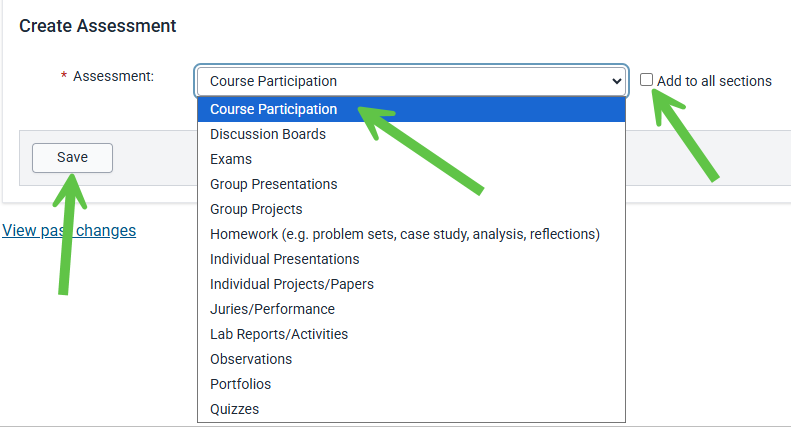
- Course participation
- Discussion boards
- Exams
- Group presentations
- Group projects
- Homework (e.g., problem sets, case study, analysis, reflections)
- Individual presentations
- Individual projects/papers
- Juries/performance
- Lab reports/activities
- Observations
- Portfolios
- Quizzes
Assessments Data Load to MAUI
Assessments information will be extracted from the most recent fall syllabus uploaded to MAUI and loaded into fall 2026 course sections. Extracted assessments information will display in a list. Departments can edit assessments information beginning around April 21, 2026. Departments will be notified when the ability to edit assessments is live in MAUI.
Learning Objectives Information
Learning Objectives Definition
A learning objective is a concise, measurable statement that describes what a student will know, be able to do, and/or demonstrate as a result of a specific course, module, and/or learning activity, focusing on observable outcomes and using actionable verbs to guide both instruction and assessment toward achieving intended academic goals.
Learning Objectives Details
The learning objective field is stored in the MAUI Course Library and is consistent across all sections of the course. If a course has General Education CLAS Core status, standard learning objectives associated with the gen ed are automatically added. No custom learning objectives can be requested for the course.
Learning Objectives Data Load to MAUI
For fall 2026 only, learning objectives will be extracted from uploaded syllabi and automatically added to non-GE CLAS Core courses. Users will be able to see this information in MAUI at the course or section level on April 21, 2026.
Topics Information
Topics Definition
Topics are the main ideas, concepts, or subject areas addressed over the duration of the course.
Topics Details
Topics are placed at the course section level. They can vary by section depending on the instructor and the section content. Topics will replicate forward as part of MAUI's standard replication process (fall to fall, spring to spring, etc.).
Topics Data Load to MAUI
Topics information will be extracted from the most recent fall syllabus uploaded to MAUI and loaded into fall 2026 course sections. Extracted topics information will display in a list. Departments can edit topics information beginning around April 21, 2026. Departments will be notified when the ability to edit topics is live in MAUI.
Syllabi Compliance Tracking
To be considered compliant with the Syllabi initiative, all of the following must be present:
- Course Title (set through Course Library)
- Course Description (using General Catalog Description)
- Learning Objectives (GE objectives or Learning Objectives)
- Assessments (one or more assessment types must be present)
- Topics (one or more course topics must be present)
- Readings, Textbooks, Resources (any resource a student is required to purchase or otherwise obtain which is not provided by the instructor must be listed)
Please refer to the Included and Exempt Courses list. The Syllabi Compliance dashboard shows compliance information; the Syllabus Content Review dashboard allows for review of existing syllabi component information.
Syllabi Dashboards
Two resources are available in the Offerings Planner panel in MAUI. These are live reports that reflect changes as soon as updates have been made to course sections.
The Syllabi Compliance report provides information about compliance and clearly shows where required information is missing.
The Syllabus Content Review report allows for review of existing syllabi components and results are exportable.
Syllabi Compliance Report
Please Note
- If your access is scoped to a college, initial view is a list of departments with the total sections by department, with drill-down into individual departments
- If your access is scoped to a department, you’ll just see the list of your courses.
- All courses are linked back to that course section in Offerings Planner for editing.
Syllabus Content Review Report
Please Note
- If your access is scoped to a college, initial view is a list of departments with the total sections by department, with drill-down into individual departments
- If your access is scoped to a department, you’ll just see the list of your courses.
- All courses are linked back to that course section in Offerings Planner for editing.
- "Same as XXXX" information will display for Topics and Assessments when a section's content is the same for all sections of a course.
Add and Edit Assessments, Learning Objectives, and Topics
For fall 2026 course sections missing required information, departments must either manually enter it (assessments and topics) or request updates in the Course Library (learning objectives). Departments may also edit information which was imported during the data load process.
Add Assessments
Navigate to the Assessments panel in the course section in Offerings Planner
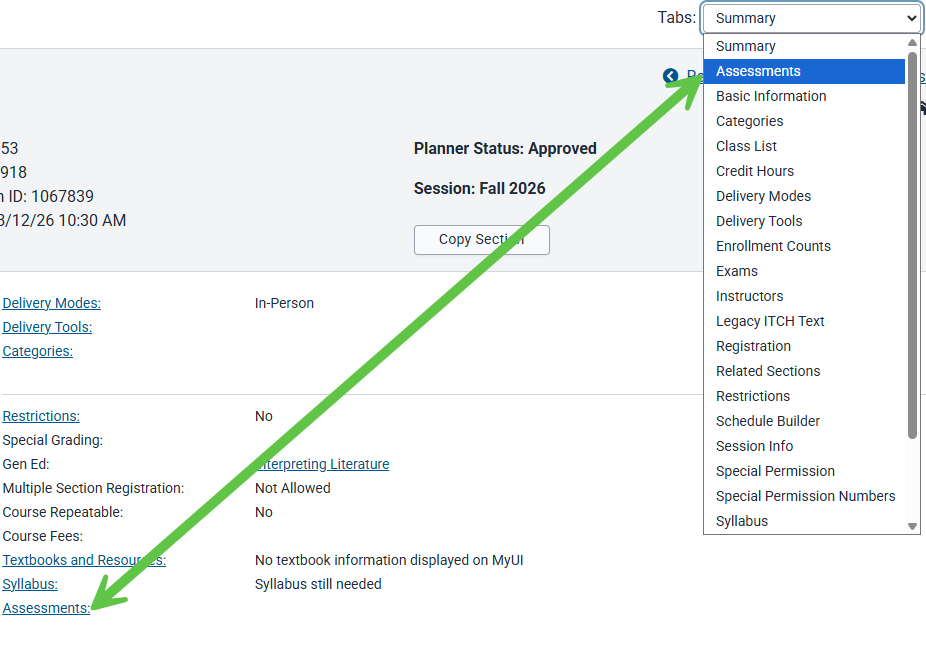
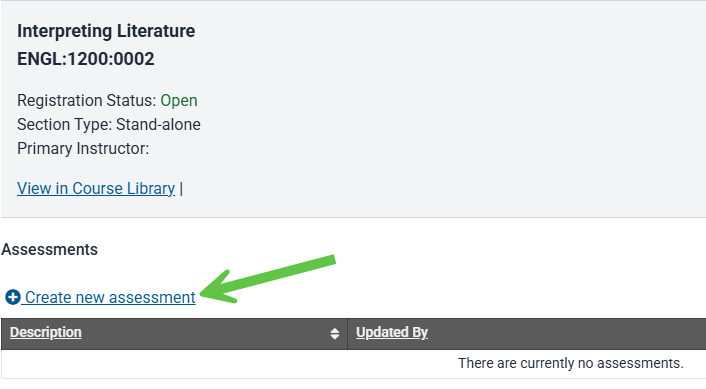
Select "create new assessment"
Select an Assessment type from the drop down list, add to all sections (if applicable) and save
A message displays confirming the assessment was saved
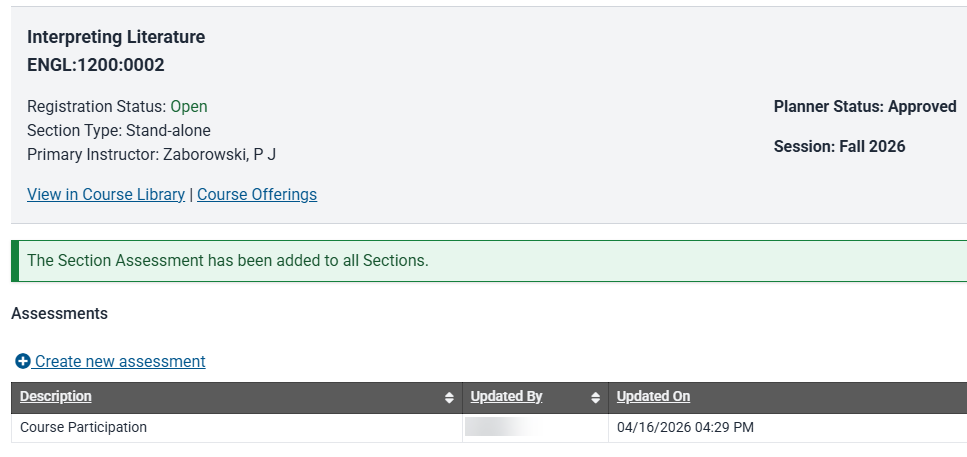
Repeat to add more Assessment types to the section
Edit or Remove Assessments
Navigate to the Assessments panel in the course section in Offerings Planner
To delete existing Assessment type select the trash can icon
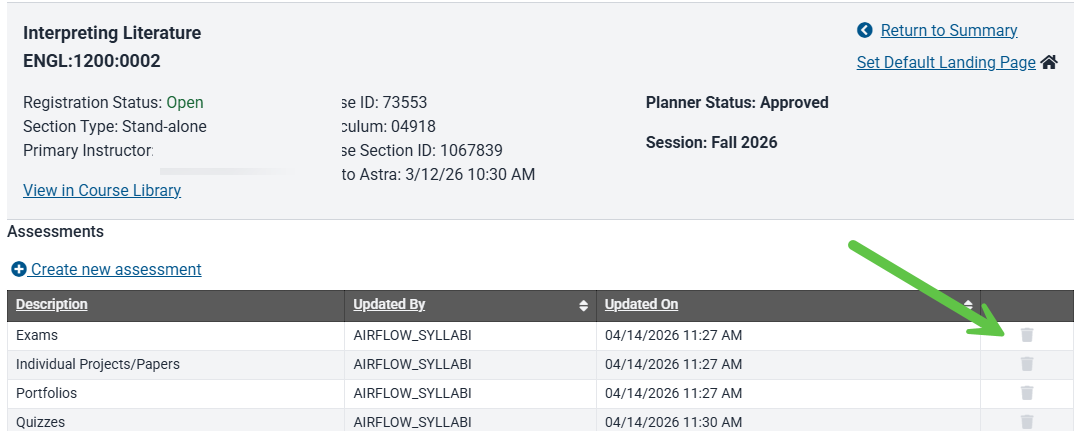
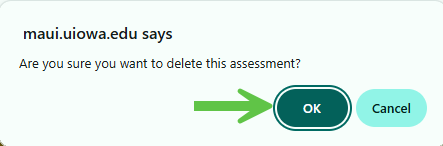
A pop up message requires confirmation to delete the assessment type
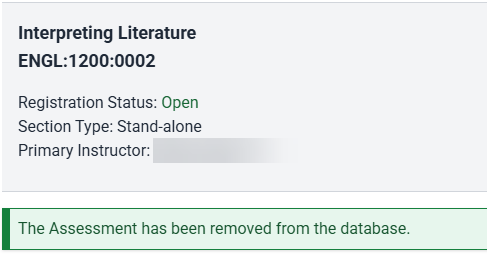
A message confirms the assessment was deleted
To add a new Assessment type select "create new assessment"
Add Learning Objectives
Fall 2026 Data Load
For fall 2026 only, learning objectives will be extracted from uploaded syllabi and automatically added to non-GE CLAS Core courses. Users will be able to see this information in MAUI at the course or section level on April 21, 2026.
How to request addition of Learning Objectives
To submit new or updated objectives to non-GE CLAS Core courses, please email the Course Library team (reg-course-approval@uiowa.edu) with the course subject/number, course title, and learning objectives by August 21, 2026.
Edit Learning Objectives
Fall 2026 Learning Objective Edits
To submit new or updated objectives for non-GE CLAS Core courses, please email the Course Library team (reg-course-approval@uiowa.edu) with the course subject/number, course title, and learning objectives by August 21, 2026.
Post-fall 2026 Learning Objective Edits
For semesters after fall 2026, individuals will utilize the course library revise course form to request edits to learning objectives.
Learning objectives added during the fall 2026 initiative will remain in effect until the department requests an update for a future session.
Add Topics
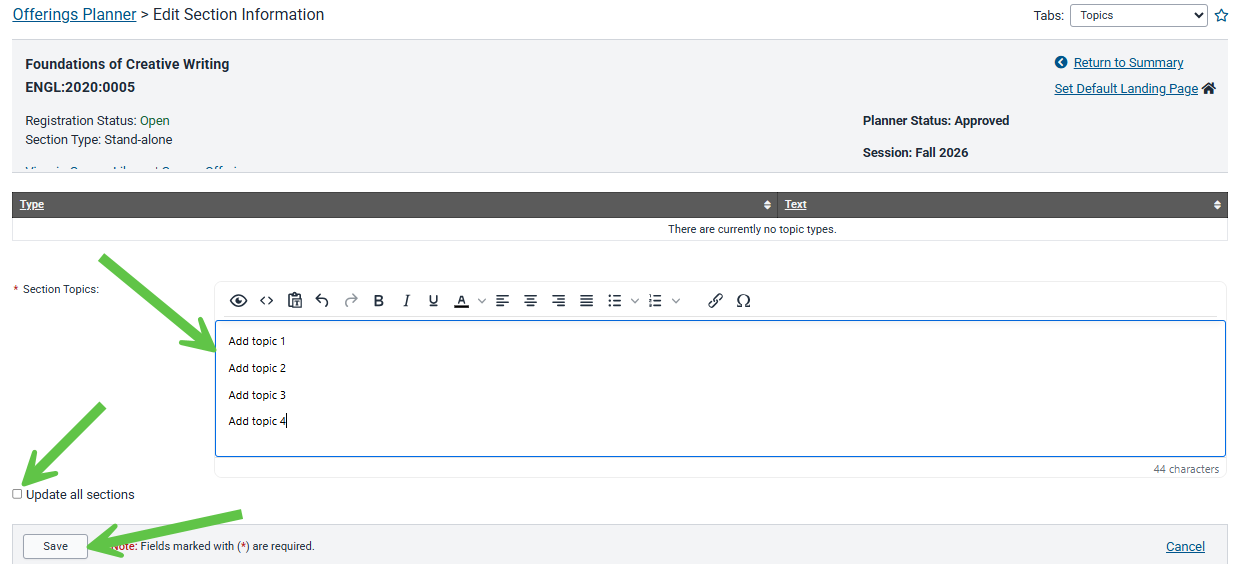
Navigate to the Topics panel in the course section in Offerings Planner
The Topics panel can be accessed via the Tabs area at the top right of the screen when viewing a section or by selecting the Topics link on the section summary panel.

Use the text field to add Topics information, add to all sections (if applicable), and save
The preferred format is to create a list of topics as opposed to paragraph format. This format will more closely match content imported from syllabi.
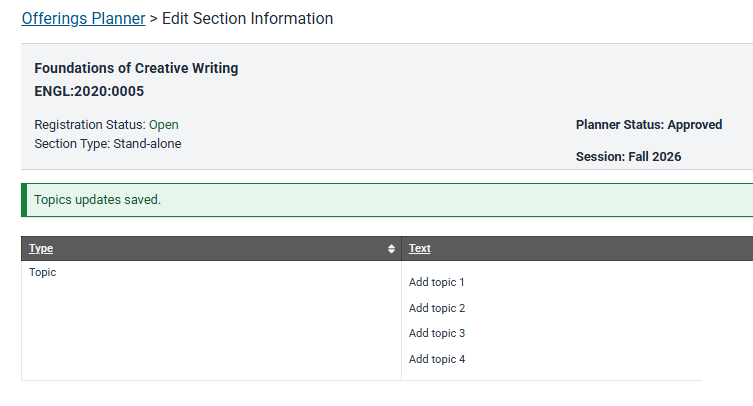
A message displays confirming Topics were saved
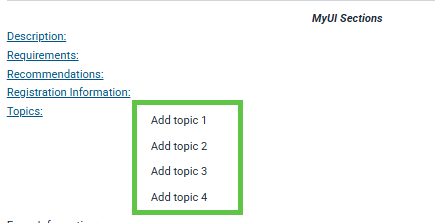
On the summary panel the Topics will display in a list
Edit Topics
Navigate to the Topics panel in the course section in Offerings Planner
Make the desired edits in the text field, copy to all sections (if applicable) and save
MAUI Syllabi Report
Syllabi Report Text Display and MyUI Text Display
The MAUI report displays HTML characters that are present. These characters will not display in MyUI. The new Syllabus Content Review report provides an HTML free view of Learning Objectives, Topics, and Assessments.
PLEASE NOTE: The report shows day-old information. Updates made to course sections will be live as soon as they are made but the report will not reflect those changes until the next day.
MyUI Text Preview
There is a preview at the top of the Topics panel. This preview demonstrates how text will display in MyUI.
How to Use the Syllabi Report
The Syllabi Report can be used to locate course sections missing syllabi and to see if any updates to existing content are needed.
Please Note
- The report shows day old information. Updates made to course sections will not be reflected in the report until the following day.
- The report shows all course sections, not only those required to provide syllabi. Use the "syllabus required" and "syllabus components complete" filters to review content and locate sections which are not yet compliant.
- For a section to be compliant, assessments, topics, and learning objectives must all be present.
- If the course is a Gen Ed, those learning objectives will be used and separate learning objectives are not required.
Syllabi Report Instructions
Locate the Syllabi Report
The Syllabi Report is available in both MAUI and Campus Data.
Set Report Filters and Select "View Report"
- Session - Select one
- College - Select one
- Academic Unit - select those academic units relevant for your department
- Course Subject
- Course - select all or view a specific course
- Section Type - can view all; only stand-alone and lecture section types are checked for compliance
- Syllabus Required
- Yes/No displays all sections
- Yes shows only sections required to meet compliance
- No shows only sections not required to meet compliance
- Syllabus Components Complete
- Yes/No displays all
- Yes displays sections with all components complete
- No displays sections with one or more components missing
View Report

Download the report by selecting the floppy disc icon and file type
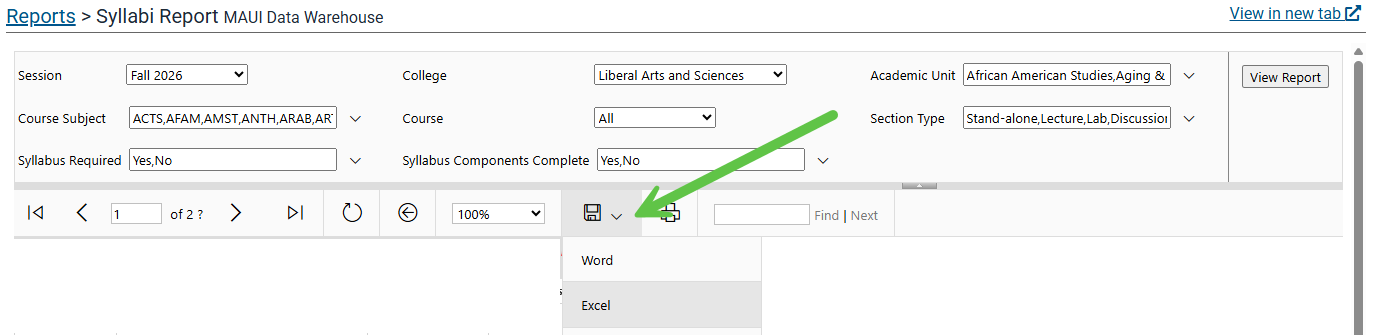
Set Report Filters to view desired information
View sections required for compliance with missing components
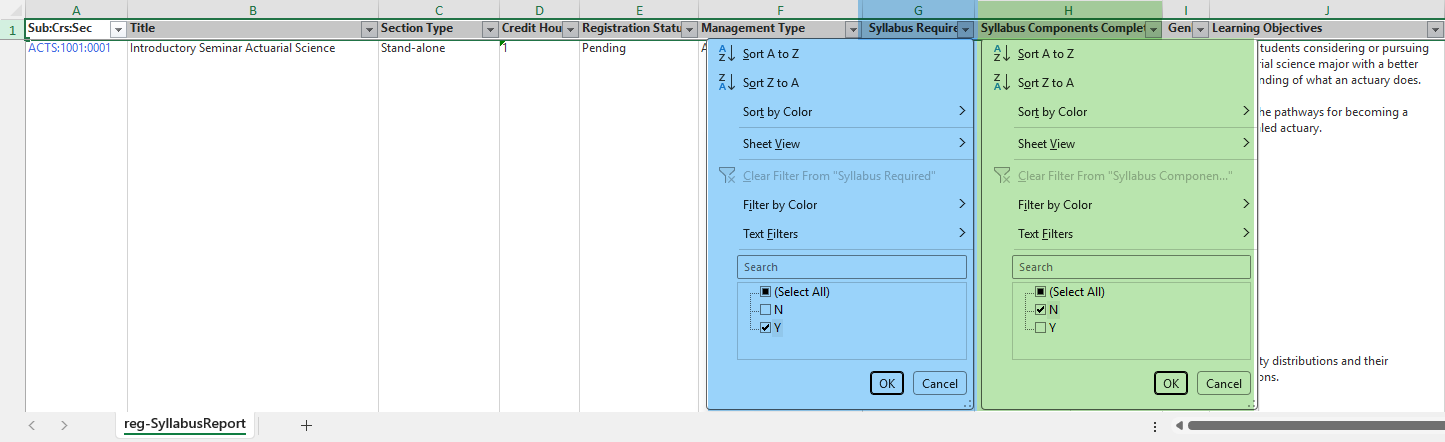
Set filters:
- Syllabus Required: Y
Syllabus Components Complete: N
View Missing Learning Objectives
Using the Learning Objectives filter, deselect all, scroll down, select "blanks" and "ok". Using the GenEd filter, deselect "Y" to remove courses that will use GE CLAS Core learning objectives.

Review the add learning objectives instructions.
View Missing Topics
Clear any filters, then use the Topics filter to deselect all, scroll down, select "blanks" and "ok"
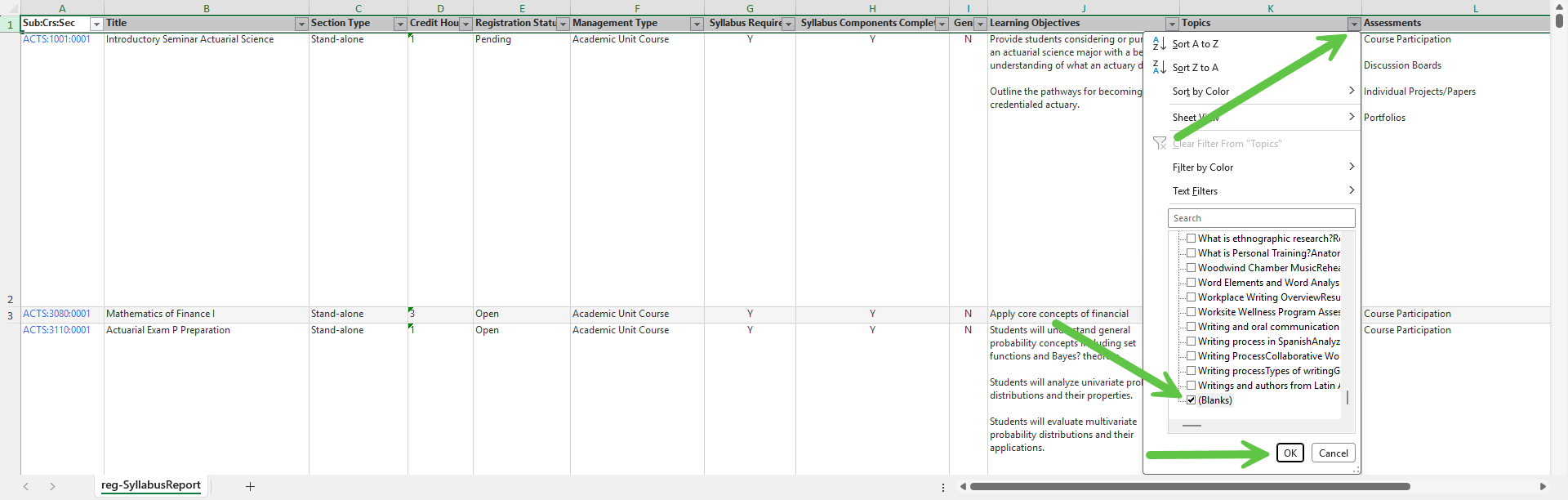
Use the course section hyperlink to navigate to the section and follow the topics text entry instructions.
View Missing Assessments
Clear any filters, then use the Assessments filter to deselect all, scroll down, select "blanks" and "ok"
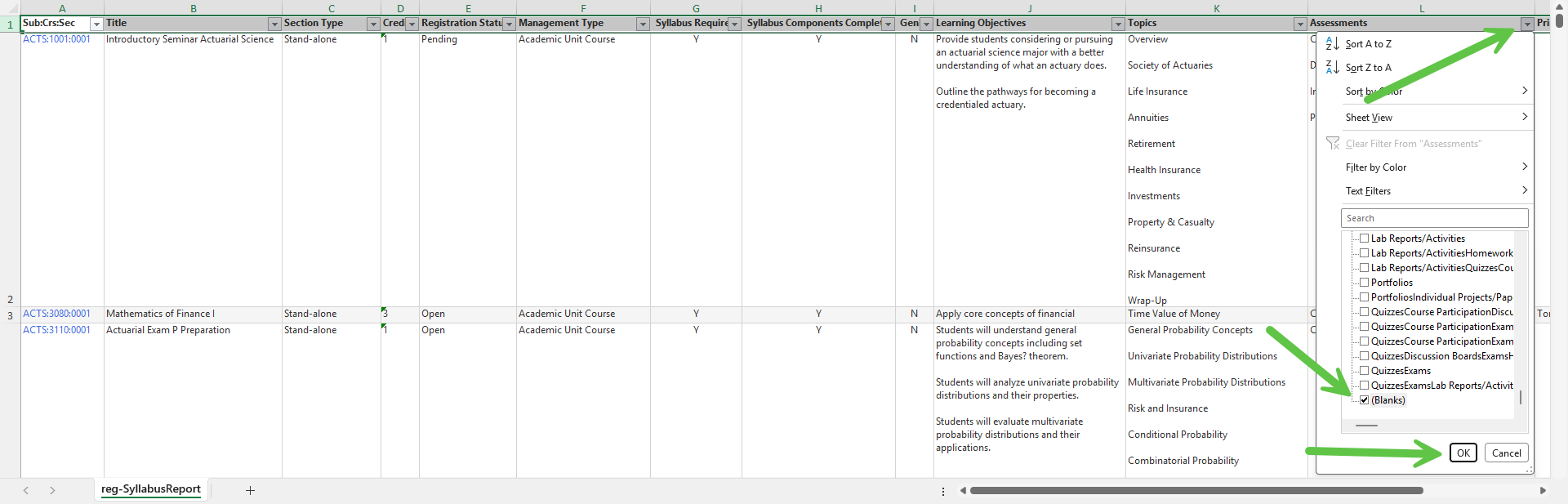
Use the course section hyperlink to navigate to the section and follow the assessments text entry instructions.
Use the course section hyperlink to navigate to the section where Topics and Assessments can be added or edited

Syllabi Project FAQs
A few course sections have missing components while other sections of a course have the information. What happened?
Spring 2026 course sections were populated by using fall 2026 content, matching to course section numbers for spring 2027 courses. Courses which do not meet in the fall were populated with information present in spring 2026 sections. If the section did not exist in fall 2026 or a spring 2026 syllabus was not available, the section will be missing content. Information can be entered manually into the section, or, if content is present in another section of the course, the "copy to all" feature can be utilized.
What do we do if we are not satisfied with the information extracted from syllabi?
Departments may adjust assessments and topics content. The information can be copied to all sections of a course, if desired.
Since a syllabus PDF will no longer be viewable in MyUI, where will students see the syllabi component information?
New fields are being added to the Course Summary page in Course Browse. Assessments, topics, and learning objectives will have their own content areas. The other required items: course title, course description (General Catalog description), and readings, resources, and textbooks will display as usual. The syllabus area will be removed.
Can I review all syllabi components for my department's courses in one place?
Yes! The Syllabi Report displays all component content. The report shows all of your sections, even if they do not need to meet the new requirements, with an indicator showing if compliance is required for the course. Information to guide use of the Syllabi Report is available.
We already use the MyUI course and section descriptions. How does the project effect what we put in those fields?
Departments are still welcome and encouraged to use the various MyUI fields to provide course information. While there is no requirement to remove information that duplicates assessments, topics, and learning objectives, we recommend reviewing the content in these fields via the Course Section Information Review report.
Can graduate-level courses also use the syllabi fields?
Yes, any course can utilize the syllabi fields. The information listed in these fields will be viewable in MyUI.
How long do we have to add and update information?
We're asking that updates to assessments, learning objectives, and topics be requested or entered into spring 2027 course sections before November 8, 2026.