Development of this page is in progress. If you are looking for help with restrictions, and the information is not yet on the page, please reach out to our team.
Search for Existing Restrictions
Nearly 300 restrictions already exist in MAUI. Please review the Course Section Restriction list prior to requesting a new restriction. It's possible there is already one which will meet your needs.
See below for tips navigating the restriction list.
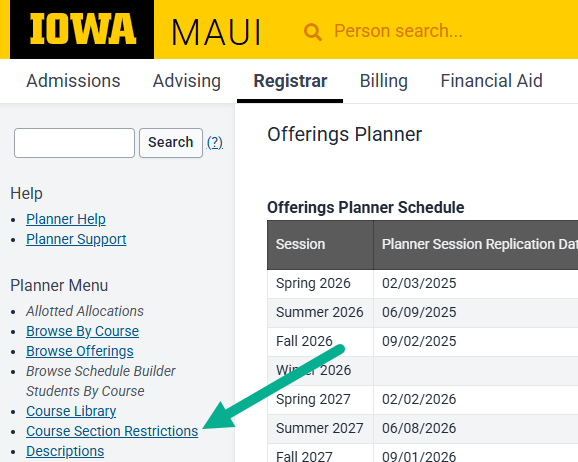
Navigate to the Course Section Restrictions List via the left side panel in Offerings Planner
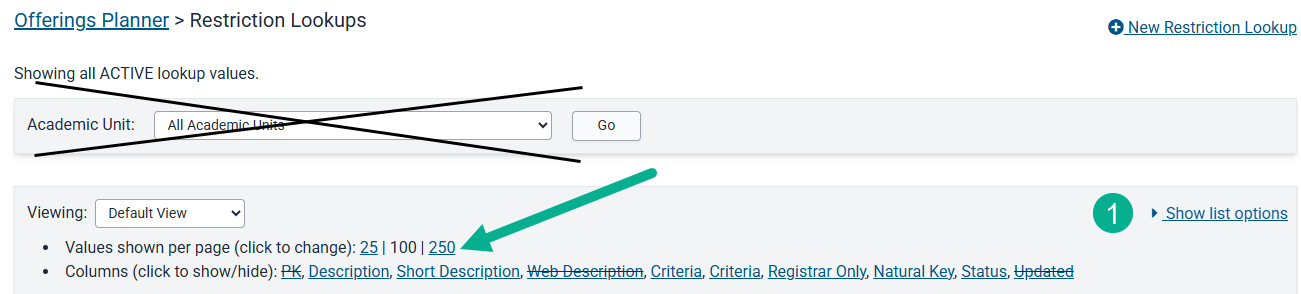
First select "Show List Options" on the right side of the page, then change values shown to 250
The Academic Unit search does not currently function. Changing the values shown to 250 will allow you to search almost all restrictions. There is a 2nd page where the remaining restrictions will display.
Use Ctrl+F to search for key words
After searching for key words use the down carat to scroll through the other search results.

If your key word search doesn't return results try altering your search words and/or checking the 2nd page of restrictions

Report can be exported for ease of searching for restrictions
Scroll to the bottom of the screen. On the right hand side below the restriction table select export option CSV or Excel.

Creating a New Restriction
THIS AREA OF THE PAGE IS UNDER CONSTRUCTION
Restriction Definitions
There are several pieces of information which must be determined in order for a restriction to be created. These pieces of information are displayed in various places in MAUI and in MyUI.
Restriction Description
Restriction Description information
- The Restriction Description, or Restriction Long Description, is crafted by a College or Department to explain which student population(s) will be able to use the restriction to enroll or join a waitlist. There is a 75 character maximum.
- The words "Restricted to" are typically used at the beginning of the restriction name.
- Departments provide a restriction name when submitting a restriction request. To maintain formatting consistency the Office of the Registrar may make small changes to the requested restriction name.
Where Restriction Description displays in MyUI
Where Restriction Description displays in MAUI
Restriction Description best practices
Restriction Description examples
Restriction Short Description
Short Description information
- The restriction short description is limited to 25 characters. It is an abbreviated version of the long description.
- The words "restricted to" are typically excluded from a short description due to the low character limit.
- The restrictions a department sees in their restriction list is determined by the Academic Unit or units selected at the time a restriction is created.
Where the Short Description displays in MyUI
Where the Short Description displays in MAUI
The short description is used when selecting a restriction for use within a course section. They display in alphabetical order.
Short Description best practices
Short Description examples
Restriction Web Description
Restriction Web Description Information
- The Restriction Web Description is optional and should be used if the long description cannot fully describe populations included in a restriction.
- If a web description is requested it will display in MyUI instead of the Restriction Description.
Where the Web Description displays in MyUI
Where the Web Description displays in MAUI
Web Description best practices
Web Description examples
Understanding Restriction Criteria Options
THIS AREA OF THE PAGE IS UNDER CONSTRUCTION
Specific criteria are used when restrictions are created. A restriction must contain at least one criteria but, more often that not, several criteria are used to tailor a restriction to a department or college's needs. It is important to understand the restriction criteria options and how the criteria are checked against a student's record in order to utilize restrictions effectively.
PLEASE NOTE: The Office of the Registrar uses the below criteria to create restrictions. The college or department does not need to supply details for all of the information below; rather, we're outlining the possible options as guidance regarding which criteria can be used to create restrictions.
Restriction Type
There are two Restriction Types: Include and Exclude.
Include
One or more populations can be included in a restriction. The number of inclusions created depends upon the complexity of the populations being outlined in the restriction.
Example 1
For a restriction including multiple subprograms, we build the restriction to include those individual subprograms. The restriction then looks to see if the student meets one or more of those subprograms.
Example 2
If a program of study is offered at both the undergraduate and graduate levels, and the restricted to population should only undergraduate students in that program, we will use the include restriction type to include only undergraduate students.
Exclude
Program College
Curricular College
Managing Academic Unit
Program
Subprogram
Learning Center
Qualifier Lookup
Objective
Level of Study
Undergraduate, Graduate, Professional
Declaration Type
Notation, Major, Minor, Certificate, Licensure Preparation, Endorsement Preparation, Non-degree, Preparatory
Student Cohort
Handling Code
Student Classification
Majors Only flag
Restriction Workflow Help
Information Coming Soon
When a new restriction is requested there are several pieces of information which must be provided in order for the restriction to be created. The information is reviewed both by the college approving the restriction request, as well as the Office of the Registrar when creating the new restriction.
Program College
Academic Unit(s) or College(s) that should be able to view or use the restriction
Restriction's first session of use
Suggested Description
Suggested Short Description
Number of students the restriction will be used for
Possible courses which will use the restriction
Restriction Criteria
Suggested Web Description (optional)